 Hibret ህብረት
The prayer board and reports from start to finish
How staff look after the prayer board: what members see, requests for pastors only, hiding and showing a request, and what to do with things members reported.
-
 123451
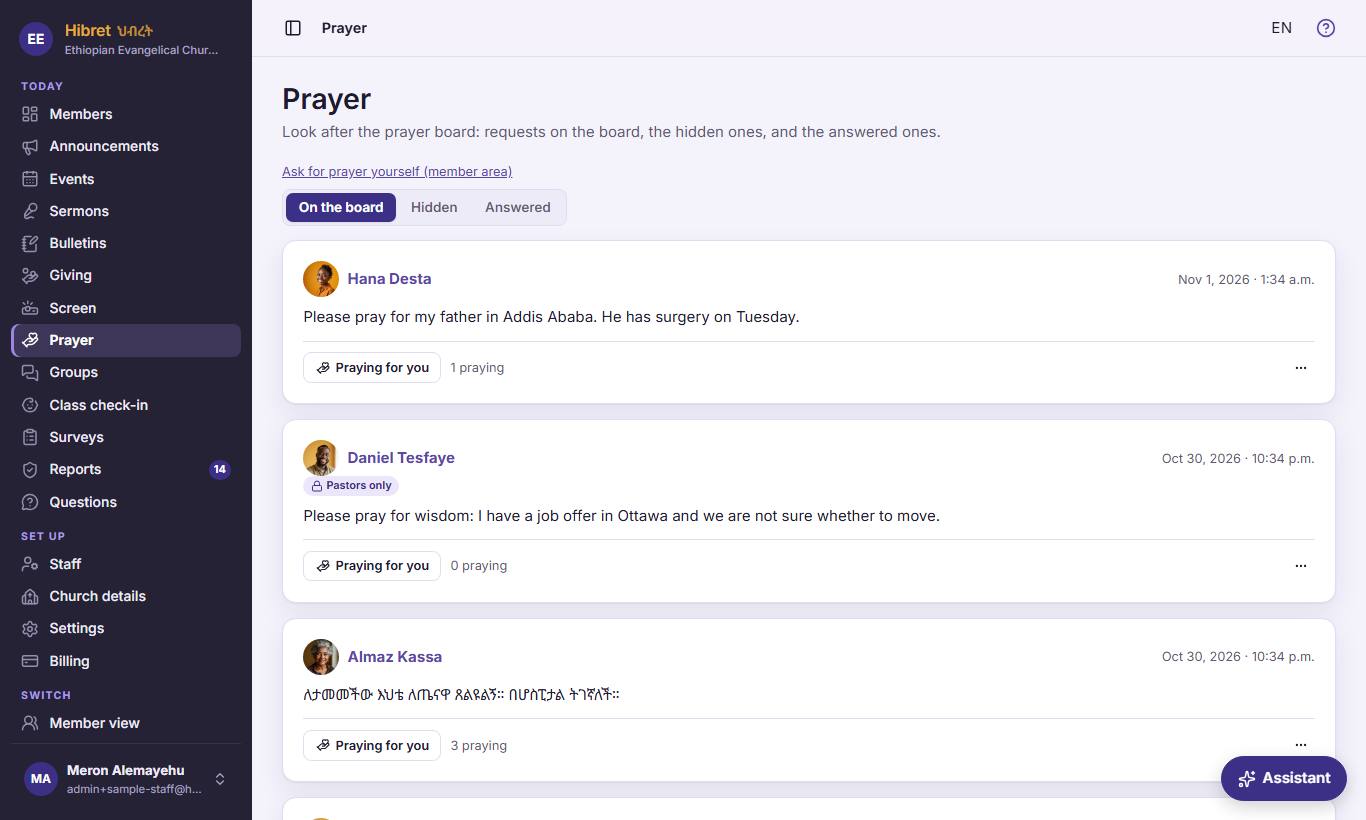
In "Prayer", the tabs 123 sort the requests. "Ask for prayer yourself (member area)" 4 is for your own request. "Pastors only" 5 marks a request members do not see.
- 1 "On the board": the requests on the board now, newest first. Staff also see here the requests for pastors only and the hidden ones, with a label on each. A request leaves the board by itself after 60 days, or when the person marks it answered.
- 2 "Hidden": the requests members do not see. Staff hid them, or members reported them, or Hibret's check held them for staff. The person who asked still sees their own request.
- 3 "Answered": the requests the person marked as answered, often with a few words on how God answered. They are a good reason to thank God together.
- 4 This page is for looking after the board. To ask for prayer yourself, use this link: it opens the prayer page of the member area, where every member asks.
- 5 "Pastors only": the member chose that only the church staff see it. It never shows to other members. Pray for it, and answer the person in private if needed.
-
 12342
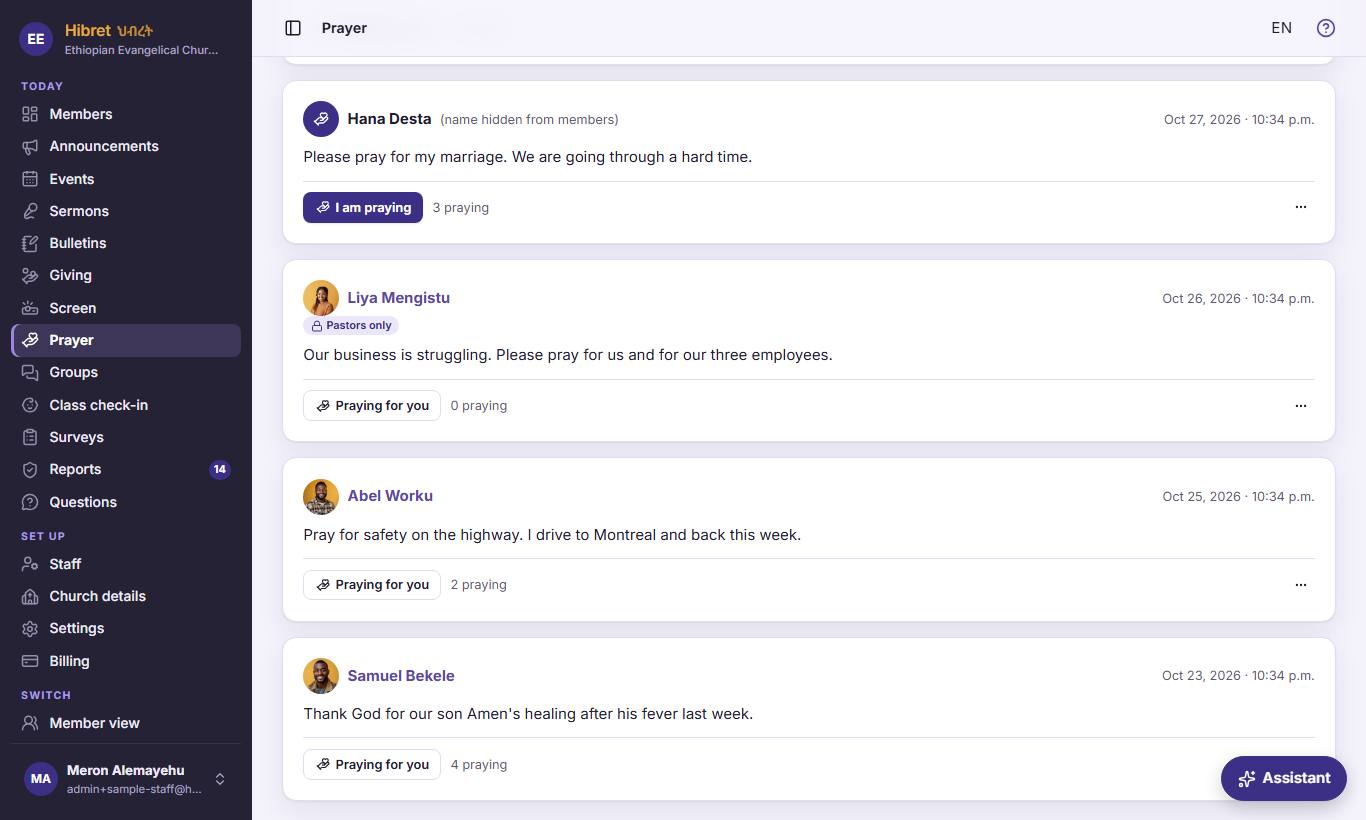
On each request: the name 1, the button 2 for praying, how many pray 3, and ··· 4 for more.
- 1 The name of the person who asked; press it to open their page. When the person chose to hide their name, members see "A church member". Staff still see the name, with "name hidden from members".
- 2 "Praying for you" tells the person that you pray for them. Press it again to take it back.
- 3 How many people pressed the button. The person who asked is encouraged to see that the church prays.
- 4 ··· opens the choices for this request. The next step shows them.
-
 1234563
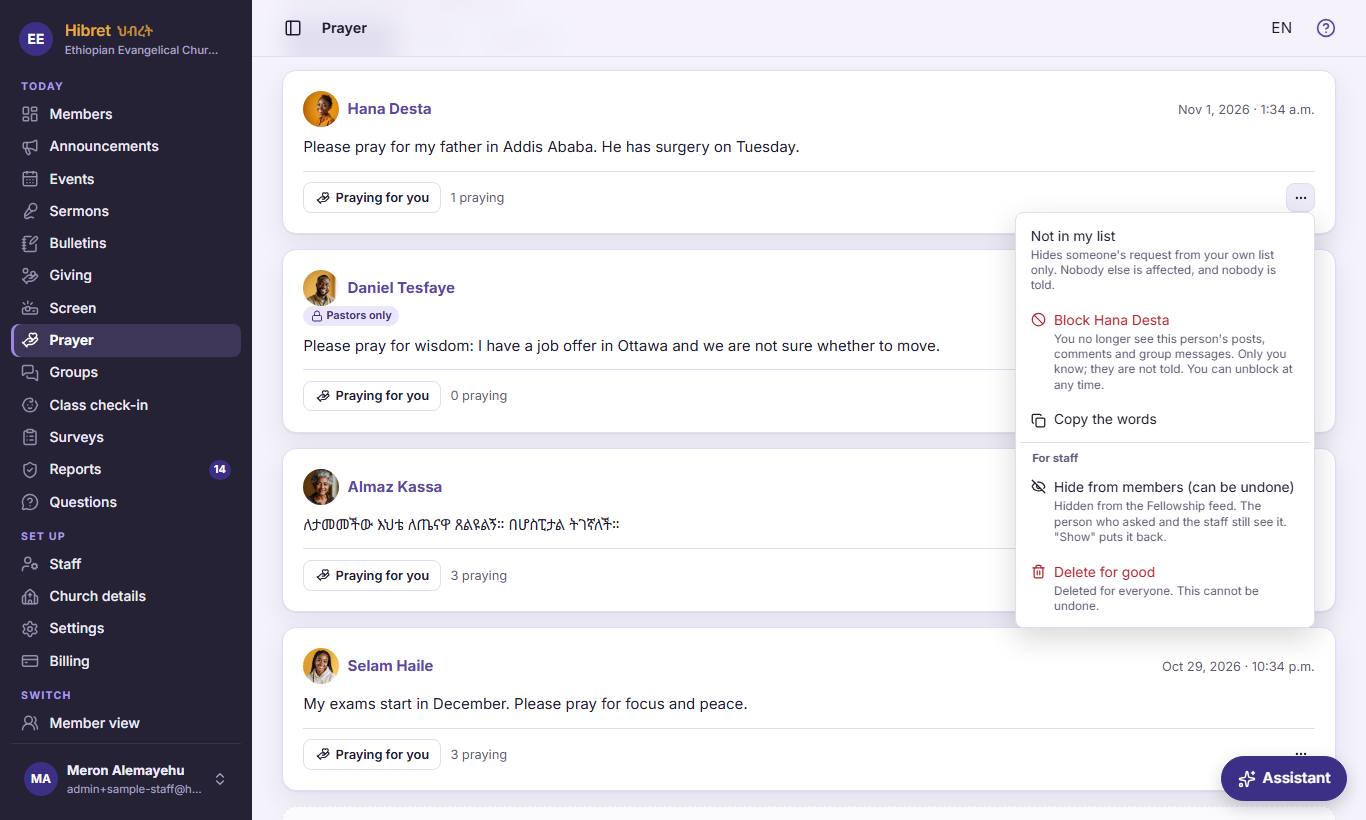
The menu of ··· 1: your own choices 234, then "For staff": "Hide from members (can be undone)" 5 and "Delete for good" 6.
- 1 Each request has its own ··· menu with only the choices you may use. Under each choice, one short line says what it does.
- 2 "Not in my list" takes this request off your own list only. Nobody else is affected, and nobody is told.
- 3 Block: you no longer see this person's posts, comments and group messages. Only you know. This is for you as a person, not a church decision.
- 4 "Copy the words" copies the request, for example to read it aloud in the prayer meeting.
- 5 "Hide from members (can be undone)": members no longer see it. The person who asked and the staff still see it. It moves to "Hidden", and "Show again" puts it back.
- 6 "Delete for good": the request is gone for everyone and cannot be brought back. Hibret asks first. Use it only when the words must not be kept at all.
Hide a request that does not belong on the board, like selling things. Hiding can be undone; deleting cannot.
-
 1234
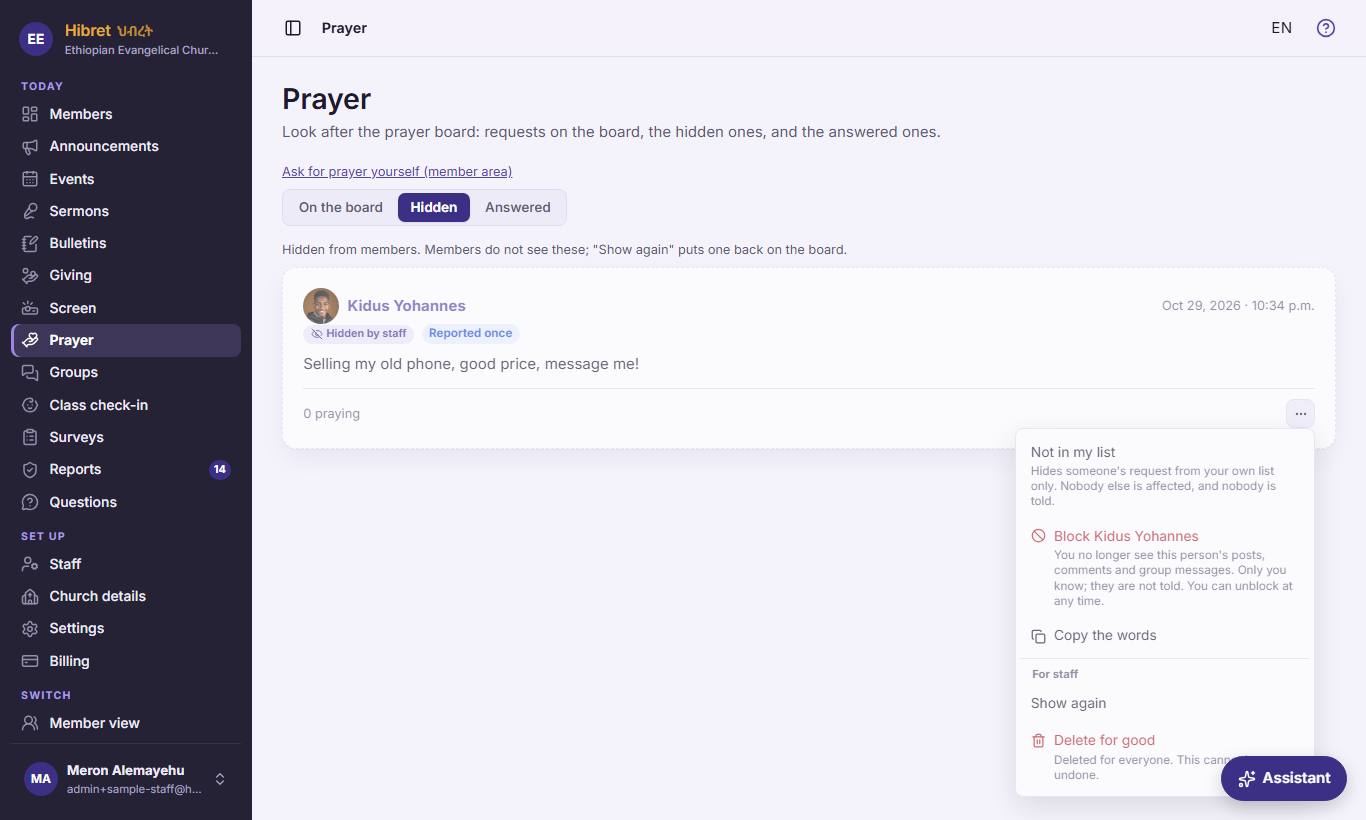
In "Hidden": the label "Hidden by staff" 1, how many reported it 2, and "Show again" 3 in the ··· menu.
- 1 "Hidden by staff": members do not see this request. It may be hidden by a staff member, by members' reports, or by Hibret's check.
- 2 How many members reported it as not suitable. When three members report a request, Hibret hides it at once, before staff look. The church owner can change this number in Settings.
- 3 "Show again": the request is fine. It goes back on the board for members, and its reports are cleared.
-
 12345675
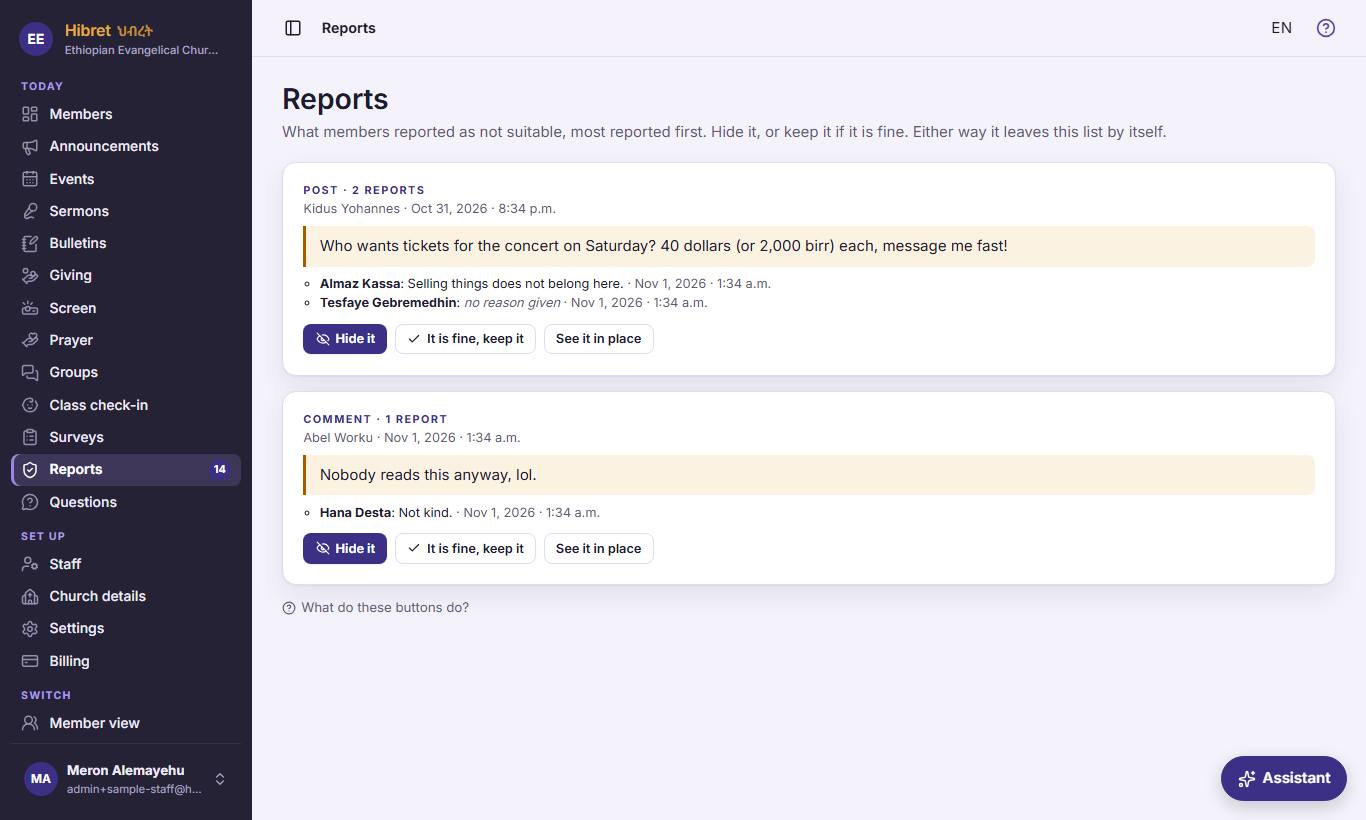
"Reports" 1: what members reported. On each item: what it is 2, the words 3, the reasons 4, then "Hide it" 5, "It is fine, keep it" 6 or "See it in place" 7.
- 1 "Reports" lists everything members reported as not suitable: posts, comments, group messages, prayer requests and ሸክም (burden) requests. The number in the menu shows how many wait. The most reported come first.
- 2 What kind of item it is, and how many reports it has. Under it: who wrote it and when.
- 3 The words that were reported, so you can decide without searching for them.
- 4 Who reported it and why. Some lines come from Hibret's own check: for example, a link to another website from a new member waits here for staff.
- 5 "Hide it": members no longer see it. The person who wrote it and the staff still see it. Hibret asks first. When members' reports hid it already, the buttons say "Keep hidden" and "Show it again".
- 6 "It is fine, keep it": nothing changes for anyone; only the report leaves this list. Use it when the item is fine.
- 7 "See it in place" shows the item where members see it, with the words around it. A post or a ሸክም opens in a new tab.
Either answer takes the item off this list.
-
 123456
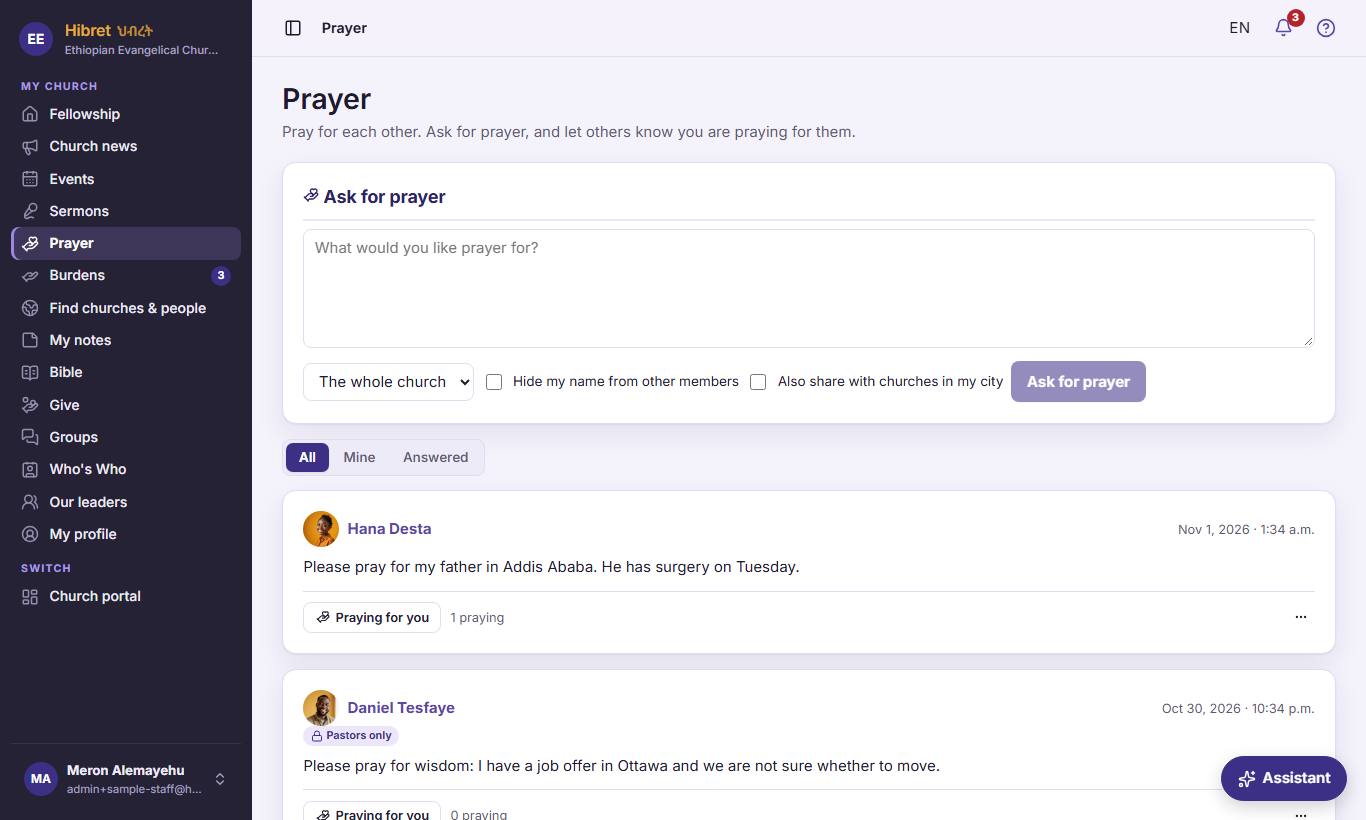
This is what members see: they write the request 1, choose who sees it 2, may hide their name 3 or share with churches in their city 4, and press "Ask for prayer" 5.
- 1 The member writes what they want prayer for, in their own words.
- 2 "Who sees it": "The whole church" puts it on the board for every approved member. "Pastors only" sends it only to the church staff.
- 3 "Hide my name from other members": other members see "A church member" instead of the name. The staff still see who asked.
- 4 "Also share with churches in my city": members of other Hibret churches in the same city can pray too. The address is never shown. A request for pastors only is never shared.
- 5 "Ask for prayer" puts the request on the board at once. The member can later mark it answered and share how God answered.
Members see the board under the form. You see the requests for pastors only there too, because you are staff; members never see them.